
Every customer relationship starts somewhere.
It might begin with a telephone call, a website enquiry, an email, a referral or a message sent through social media.
At that stage, the person or business is not necessarily a client. They may only be asking for information, considering their options or discussing work that could happen several months later.
That early opportunity still needs to be managed properly.
Waypoint’s Prospects area gives businesses a simple place to record the lead, retain the discussion and manage the next step before the person becomes a confirmed client.
When the opportunity moves forward, the prospect can be converted into a client without rebuilding the record from the beginning.
The principle is simple: record the opportunity once, manage it properly and move it into the client area without starting again.
Useful for any business that receives enquiries
Prospect management is not only for large sales teams.
Almost every business receives potential work before it becomes confirmed business.
A tradesperson may receive a request for a quotation. An adviser may speak to someone whose existing agreement ends later in the year. An estate or letting agent may hear from a potential landlord or buyer. A consultant may discuss a future project. A venue may receive an event enquiry, while a recruiter may speak to a business about an upcoming vacancy.
The industries are different, but the underlying process is the same.
- Someone expresses an interest
- Their details need to be recorded
- Conversations and follow-ups take place
- The opportunity either progresses or does not
- Successful opportunities become clients
Waypoint provides a straightforward structure for managing that journey.
Record the prospect from the beginning
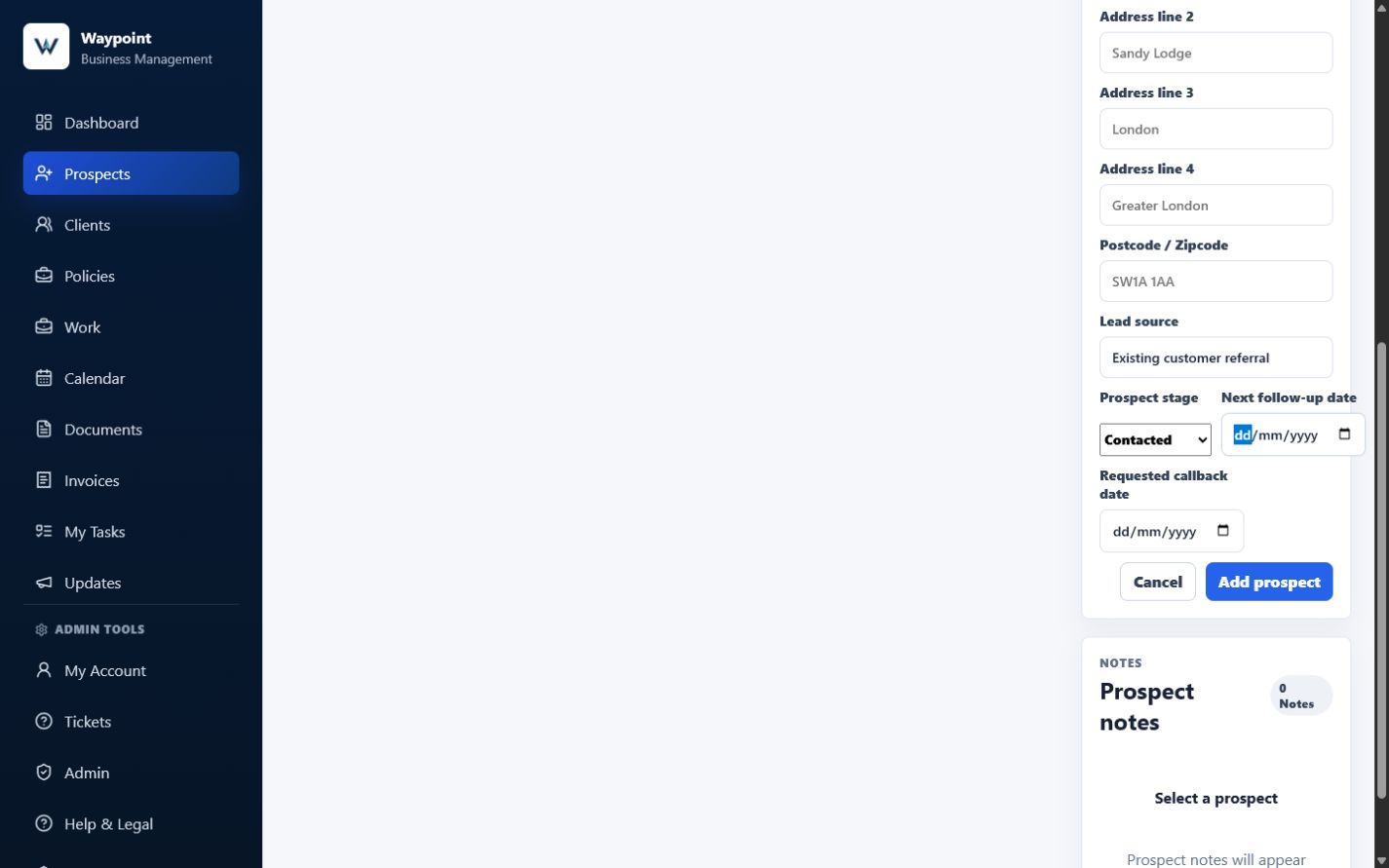
A new prospect record creates one place to retain the information known at the start of the relationship.
The current Waypoint prospect form supports the person’s first name and surname, company name, telephone number, email address, address, Lead source, Prospect stage, Next follow-up date and Requested callback date.
The live Prospect stage choices are New, Contacted, Quoted, Follow up, Won and Lost.
The service or opportunity, potential value and other commercial context are not separate prospect fields in the current interface. They can be recorded in a note so the information remains part of the discussion history.
For the demonstration used here, Emma Carter at Greenfield Property Services was recorded as an existing customer referral. The opportunity concerns an ongoing property maintenance contract with a potential annual value of £12,000, so those details were kept in the conversation note.
This prevents a promising enquiry from being left only in an inbox, notebook or message thread. It also gives the business a clear list of opportunities that have not yet become clients.
Give every opportunity a clear follow-up date
Many prospects are interested but not ready immediately.
They may be waiting for a property purchase, an existing contract to end, planning permission, a decision from a partner or director, a future renewal date, funding approval, a suitable appointment date or another project to finish.
Without a recorded follow-up date, the business has to rely on memory. That is where genuine opportunities are easily lost.
Waypoint’s exact field name is Next follow-up date. A separate Requested callback date is also available when the prospect has asked to be contacted on a particular date.
In the demonstration, the next follow-up is set for 28 July 2026. The related note explains why that date matters and what should happen when contact resumes.
Instead of thinking, “I am sure I was supposed to contact someone this month,” the business has a defined record of who needs attention and why.
Keep the discussion notes with the prospect
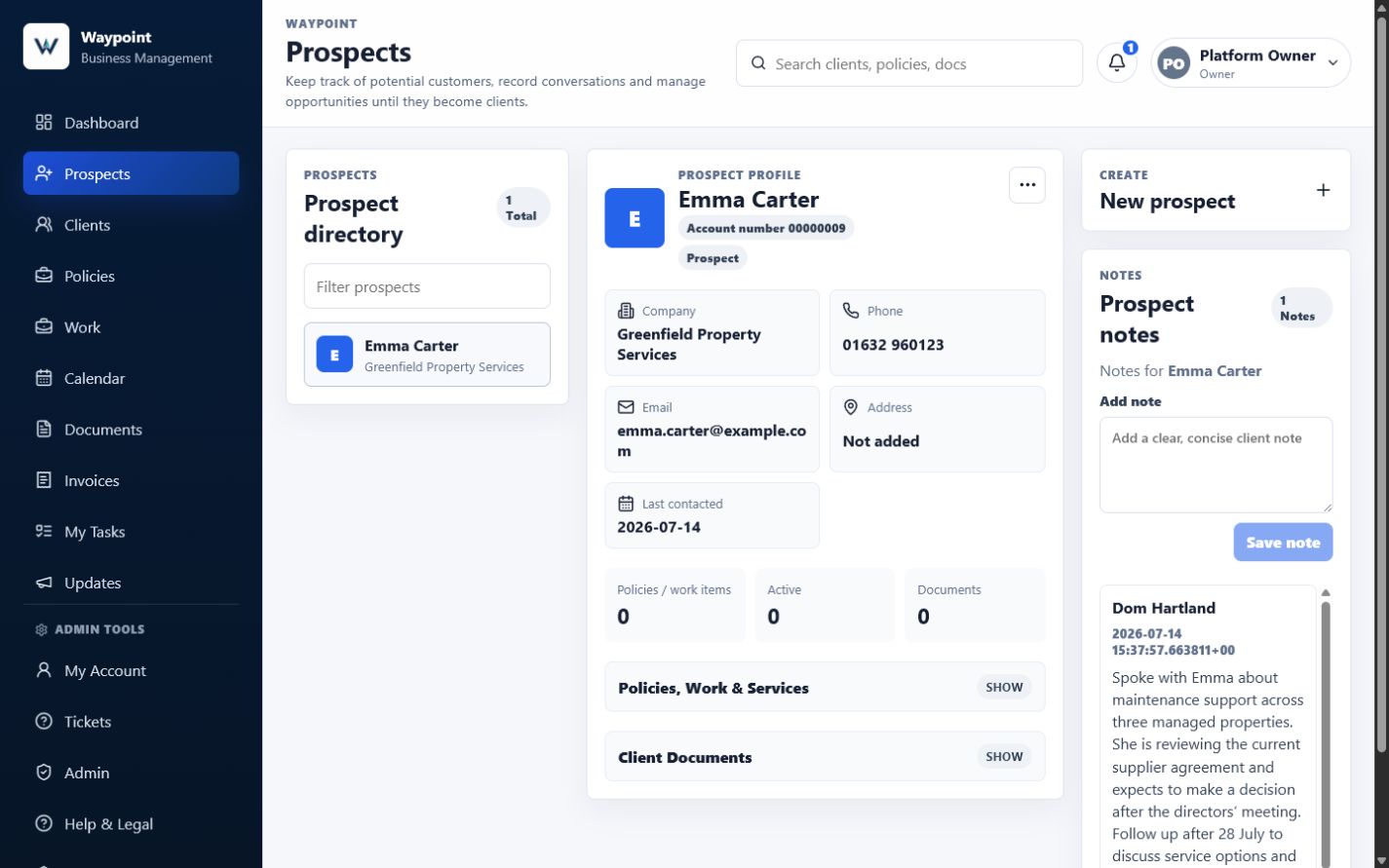
A follow-up date tells you when to make contact. The notes explain what the conversation is about.
A useful note might record what the prospect needs, which service was discussed, their approximate budget, concerns or questions, why they are not ready, who else is involved, what information was promised and what should happen next.
Several weeks or months may pass before the next contact. When that happens, the user should not need to search old emails or ask the prospect to repeat everything.
The notes allow the business to reopen the record, understand the previous discussion and continue from where it was left.
This is valuable for sole traders and even more important when several members of a team may speak to the same prospect.
Avoid creating a client too early
Not every enquiry needs to become a full client record immediately.
Some people are only gathering information. Some opportunities will not proceed. Others may remain open for several months.
Creating every enquiry as a confirmed client can fill the client area with people who never actually purchased a service or commissioned work.
Waypoint’s Prospects area keeps potential opportunities separate while they are still being considered. That gives the business a clearer distinction between potential future business, active discussions and confirmed clients.
Once the prospect agrees to proceed, the same record can move into the next stage.
Convert the prospect through a simple action
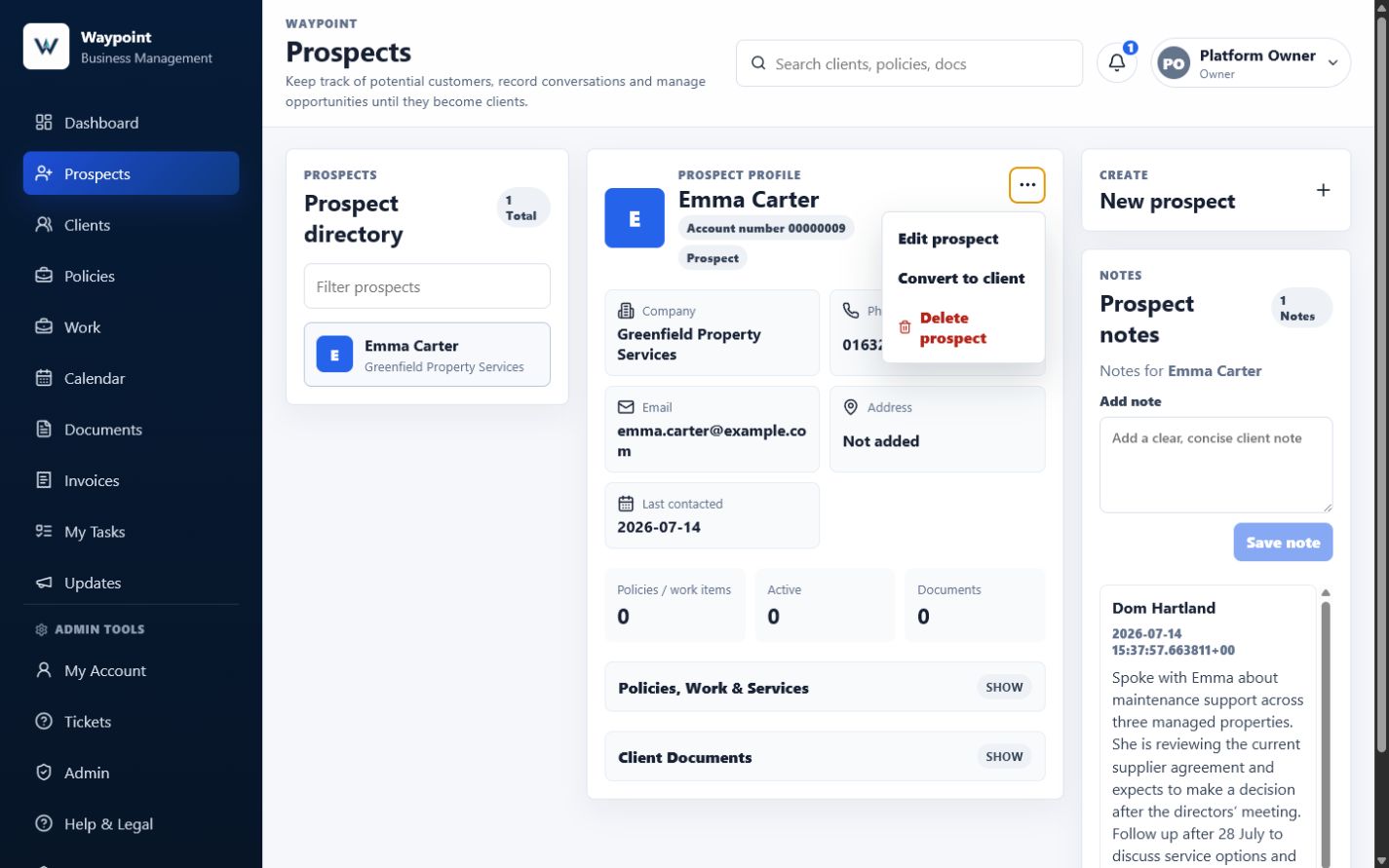
When the opportunity becomes confirmed business, the user should not need to recreate the person manually inside the Clients area.
Open the prospect’s ellipsis menu and choose the exact live action, Convert to client.
Waypoint then shows a confirmation asking whether to convert the named prospect and explaining that notes and contact details will be kept.
After confirmation, the existing record is updated rather than duplicated. Its status changes from prospect to client, its Prospect stage is marked Won, it disappears from the Prospects directory and it appears in the Clients directory.
The account number and underlying record identity remain the same, creating a direct transition instead of a second customer record.
Keep the contact details when the record moves
Manual re-entry creates avoidable work and another opportunity for mistakes.
A telephone number may be entered incorrectly. An email address may be copied with a typo. Part of an address may be missed, or a company name may be recorded differently in two places.
Because Waypoint converts the existing record in place, the supported contact details already collected remain on the new client record.
The current client profile immediately shows the same company, telephone number and email address after conversion.
Prospect-specific fields such as Next follow-up date are retained on the underlying record but are not displayed in the normal client edit form after conversion. The conversation note therefore remains the clearest visible place for the agreed follow-up context.
The user can capture the details once and continue using them as the relationship develops.
Carry the conversation history forward
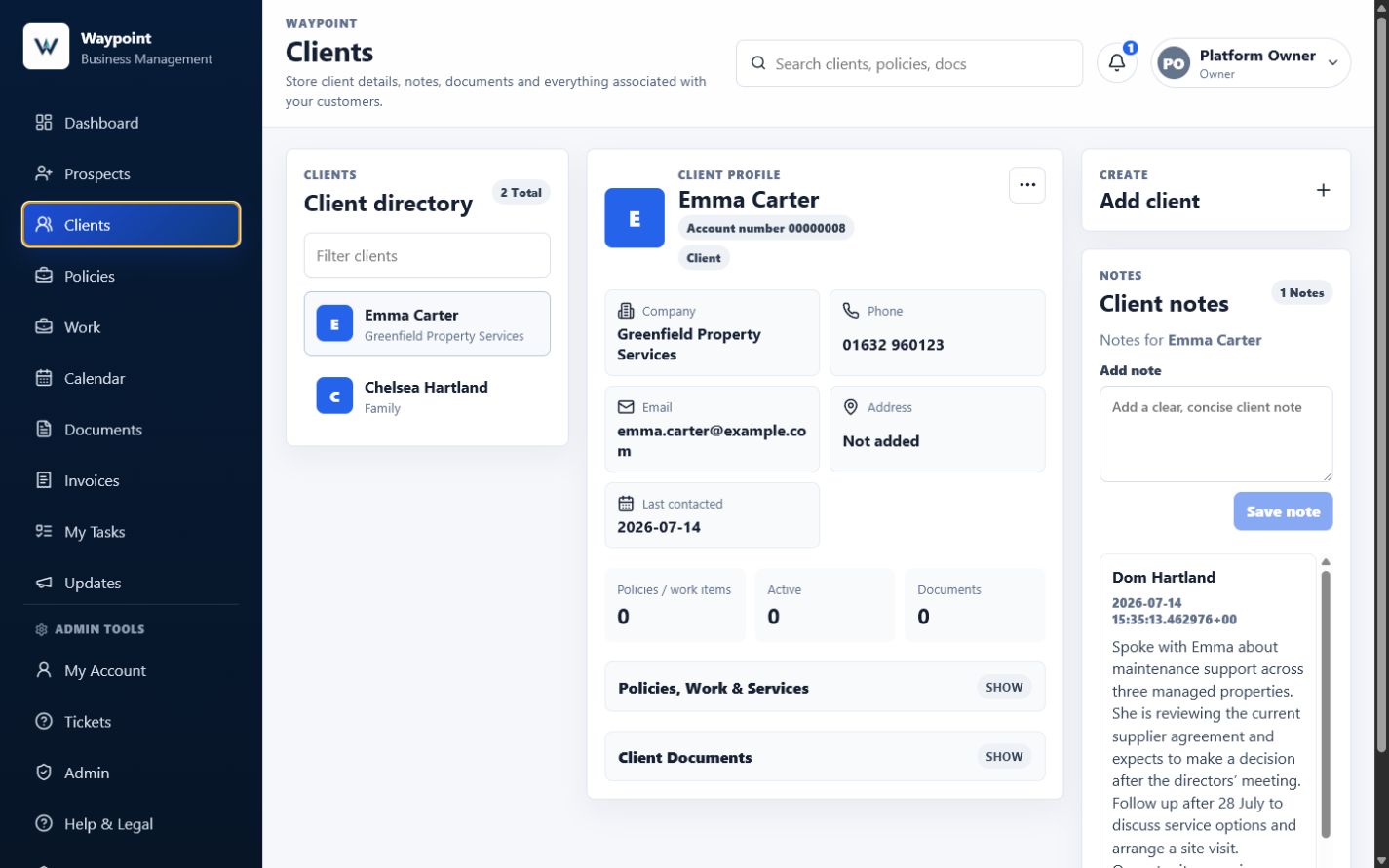
The contact details are not the only valuable part of the prospect record. The notes explain how the relationship began.
They may contain the original enquiry, services discussed, concerns, previous quotations or expectations, agreed next steps, important dates and commitments made during earlier conversations.
Waypoint keeps all notes already linked to the prospect because the same underlying record becomes the client.
In the verified demonstration, the Greenfield Property Services note remained visible in Client notes immediately after conversion, alongside the same company, phone number, email address and account number.
The client record therefore begins with useful context rather than an empty history. This maintains continuity from the first conversation into the delivery of work.
Reduce duplicate administration
Without a connected conversion process, businesses often write the enquiry in a notebook, save the contact in a phone, add a reminder to a calendar, keep discussion notes in an email and then create the person again when they become a client.
Every repeated step takes time. Every repeated step also creates another chance for the records to disagree.
Waypoint reduces this duplication by allowing the original prospect record to become the client record.
The benefit is not simply saving a few clicks. It creates a cleaner and more reliable history of the relationship.
Reduce administrative mistakes
Data-entry errors often look minor until someone needs to use the information.
An incorrect email address may prevent an invoice from arriving. An incomplete note may cause someone to repeat a question. A missing follow-up date may result in an opportunity being forgotten. Two versions of the same customer name may make previous activity difficult to locate.
By keeping the prospect journey connected, Waypoint helps reduce those avoidable inconsistencies.
The record used during the early discussions becomes the foundation for the confirmed client relationship.
Continue into work, documents and invoicing
Once the prospect becomes a client, Waypoint’s Work area can keep the activity, itemised costs, documents and invoice connected.
Conversion is not the end of the process.
The business can then connect the client to relevant activity such as Work, appointments, documents, notes, tasks, itemised costs and invoices.
This creates a clear journey: Enquiry → Prospect → Follow-up → Client → Work → Invoice.
The information collected at the beginning remains useful throughout the later stages.
A simpler start to every customer relationship
For a closer look at retaining discussion history, see how Waypoint helps businesses manage leads, notes and follow-ups.
Prospect management does not need to become a complicated sales process.
For many small businesses, the requirement is straightforward: record the person, remember the discussion, know when to follow up, convert them when they are ready and keep the information already collected.
Waypoint provides that process without requiring the user to rebuild the customer record at every stage.
The result is less duplicate administration, fewer avoidable mistakes and a clearer history from the first enquiry onwards.
Frequently asked questions
Who should be added as a prospect?
A prospect can be any person or business that has expressed an interest but has not yet become a confirmed client.
Can I store contact details against a prospect?
Yes. The current prospect form supports name, company, telephone, email and address details, along with Lead source and prospect follow-up fields.
Can I add notes from conversations?
Yes. Notes can record what was discussed, what the prospect needs, commercial context and where the conversation was left.
Can I set a follow-up date?
Yes. The current Prospects workflow includes Next follow-up date and Requested callback date fields.
How does a prospect become a client?
Open the prospect’s ellipsis menu, choose Convert to client and accept the confirmation prompt.
Do I need to re-enter all the contact details?
No. Conversion updates the existing record, so the supported contact details remain attached to it.
What happens to the prospect notes?
All notes already linked to the prospect remain visible as Client notes after conversion because the same underlying record is retained.
Does every prospect need to become a client?
No. Potential opportunities can remain in the Prospects area until they become confirmed business, or be marked Lost when they do not proceed.
Does the original prospect remain in the Prospects list?
No. After conversion, the same record appears in Clients and no longer appears in Prospects.