
Running a business often means relying on several different systems.
A spreadsheet for stock. Another place for customer information. A separate system for work. Documents stored elsewhere. Invoices eventually passed into accounting software.
Each tool may appear manageable on its own, but the information between them can quickly become disconnected.
Materials used during a job may need to be entered manually in several places. Stock levels may be updated late—or not at all. The business may know that something was purchased without having a dependable record of where it was eventually used.
That is why we have introduced Stock Management to Waypoint.
It gives businesses a practical way to organise products and materials, monitor their quantities and connect stock usage directly to the Work being completed.
Built from real business conversations
One of the most valuable parts of developing Waypoint has been speaking directly with business owners from different industries.
Rather than deciding what businesses should need, we are taking time to understand how they actually operate.
A recent conversation highlighted a familiar problem. Stock, materials, work orders and invoicing were being managed across several spreadsheets. Information was repeatedly copied between them before eventually reaching the accounting system.
The process worked, but only through a considerable amount of manual administration. It also created several opportunities for the records to fall out of step.
- Stock could be used without the quantity being updated
- Materials could be missed from the Work record
- The same information could be entered more than once
- Reordering decisions could be based on outdated figures
- It could become difficult to understand where a particular item had gone
That real-world workflow became the starting point for Waypoint Stock Management. The feature was developed through a conversation about an actual operating problem, not an assumption about how a business ought to work.
More than a list of products
Stock Management is not simply a table containing item names and quantities. Each stock item becomes a structured operational record.
The current Stock interface supports an item name, category, description, automatically generated stock reference, SKU or part number, supplier, opening quantity, unit, reorder level, unit cost, optional selling price, storage location and notes.
An item can remain active for everyday use or be archived when it is no longer needed. This creates a clearer inventory than an unstructured list while keeping the experience straightforward.
Find and organise stock quickly
As the number of items grows, the business needs more than one long list.
Waypoint can search stock reference, item name, category, SKU, supplier and location. The list can also be filtered by category and stock status, then sorted by item name, quantity or value.
Categories can reflect the way the business works. A trade business might use Building materials, Electrical, Plumbing and Consumables, while another business may prefer Products, Components, Equipment or Replacement parts.
Unused or discontinued items can be archived without removing the operational history already associated with them. Where several active items are no longer required, the current interface also supports bulk archiving.
See the current stock position
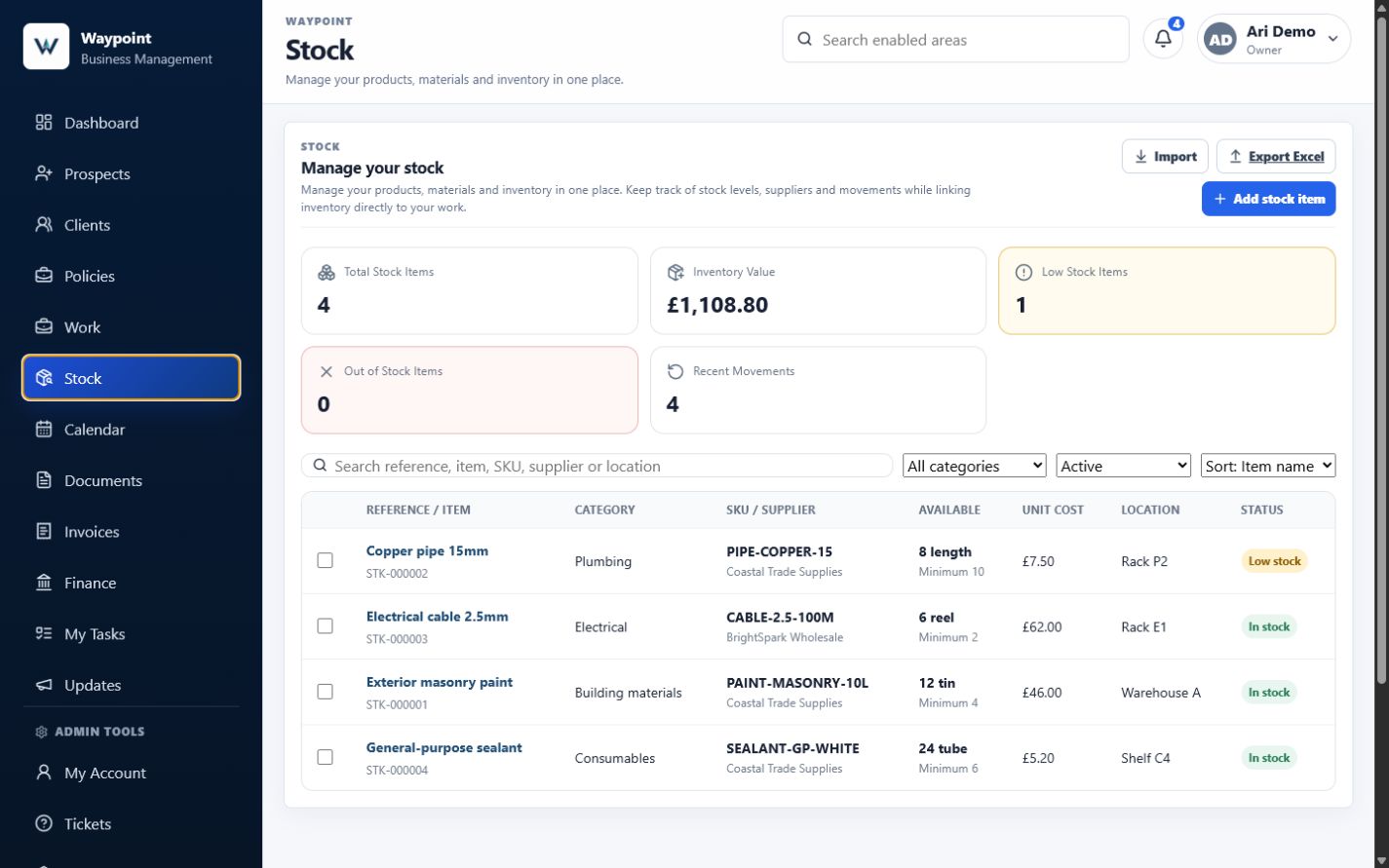
The Stock overview gives the business a concise view of its current inventory.
Summary cards show the number of active stock items, their current inventory value, how many are low in stock, how many are out of stock and how many movements were recorded during the last seven days.
The item list then shows each reference, category, SKU or supplier, available quantity, minimum level, unit cost, storage location and current status.
This provides an operational answer to a simple but important question: what do we currently have available?
Every quantity has a movement behind it
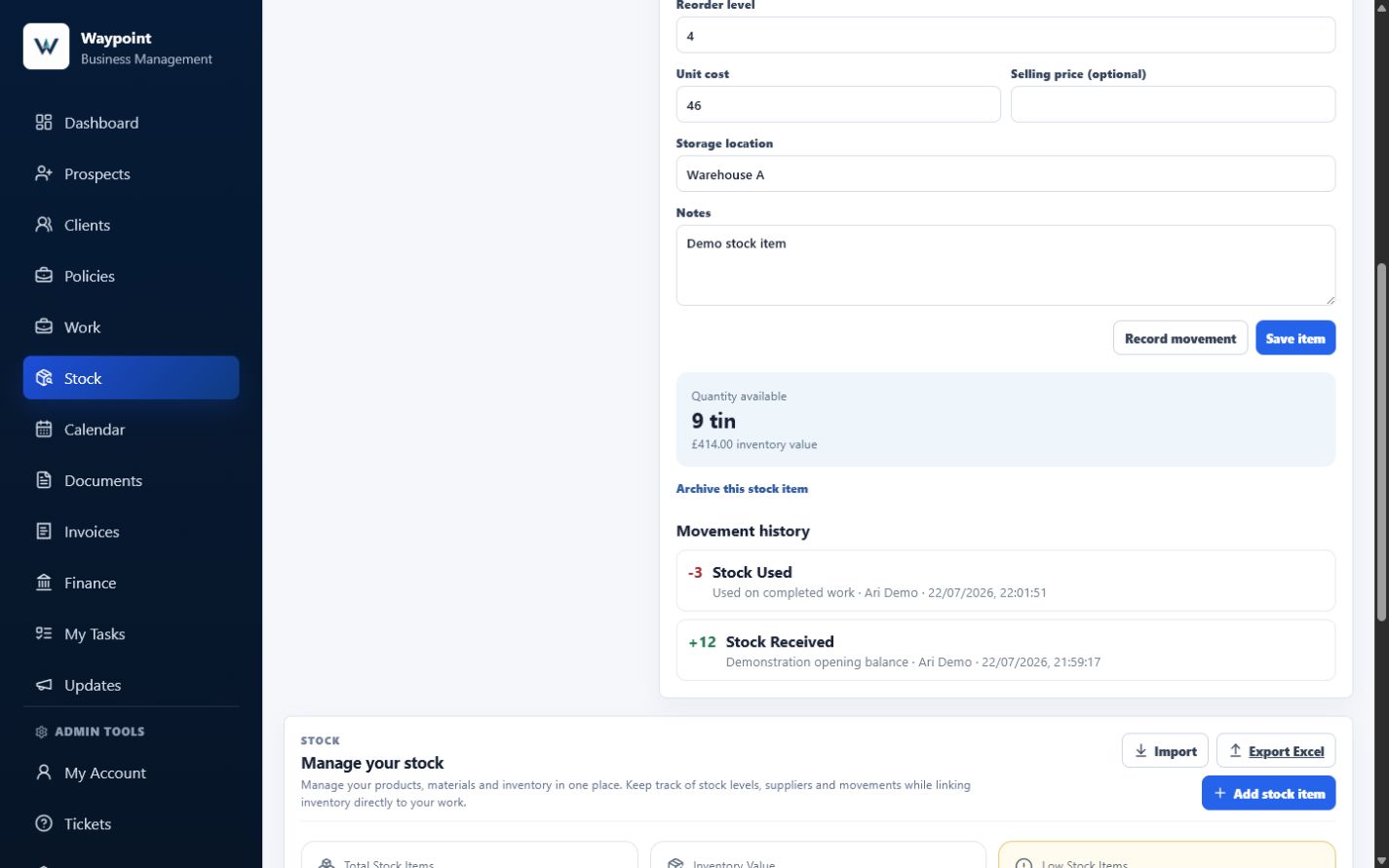
Stock levels change for a reason. New materials may be received, an item may be used during Work, stock may be returned, or a correction may be needed because something was damaged or written off.
Waypoint stores the current quantity as a controlled balance and updates it atomically whenever a movement is recorded. The retained movement information explains what changed alongside that balance.
Supported movement types include Received, Used, Returned, Adjustment, Damaged and Written off. A movement records the increase or decrease, the resulting balance, a reason, the recording user, the date and time, and—where relevant—the related Work.
The Stock overview returns the latest movements, and an item record shows its recent movement history. That makes an unexpected quantity easier to investigate than a number that has been silently replaced.
Identify low-stock items before they become a problem
Running out of a key item can delay work, create an unnecessary supplier trip or leave a customer waiting.
Each item can have a reorder level. When its available quantity is greater than zero but at or below that level, Waypoint marks it as Low stock. A quantity of zero is shown separately as Out of stock.
This makes items that may need attention visible before the stock is completely exhausted. Stock Management is not intended to become a complex procurement system; it provides the straightforward operational visibility many businesses need during the working week.
Connect materials directly to Work
This new workflow extends Waypoint’s connected Work record, which already keeps client activity, costs, documents and invoicing together.
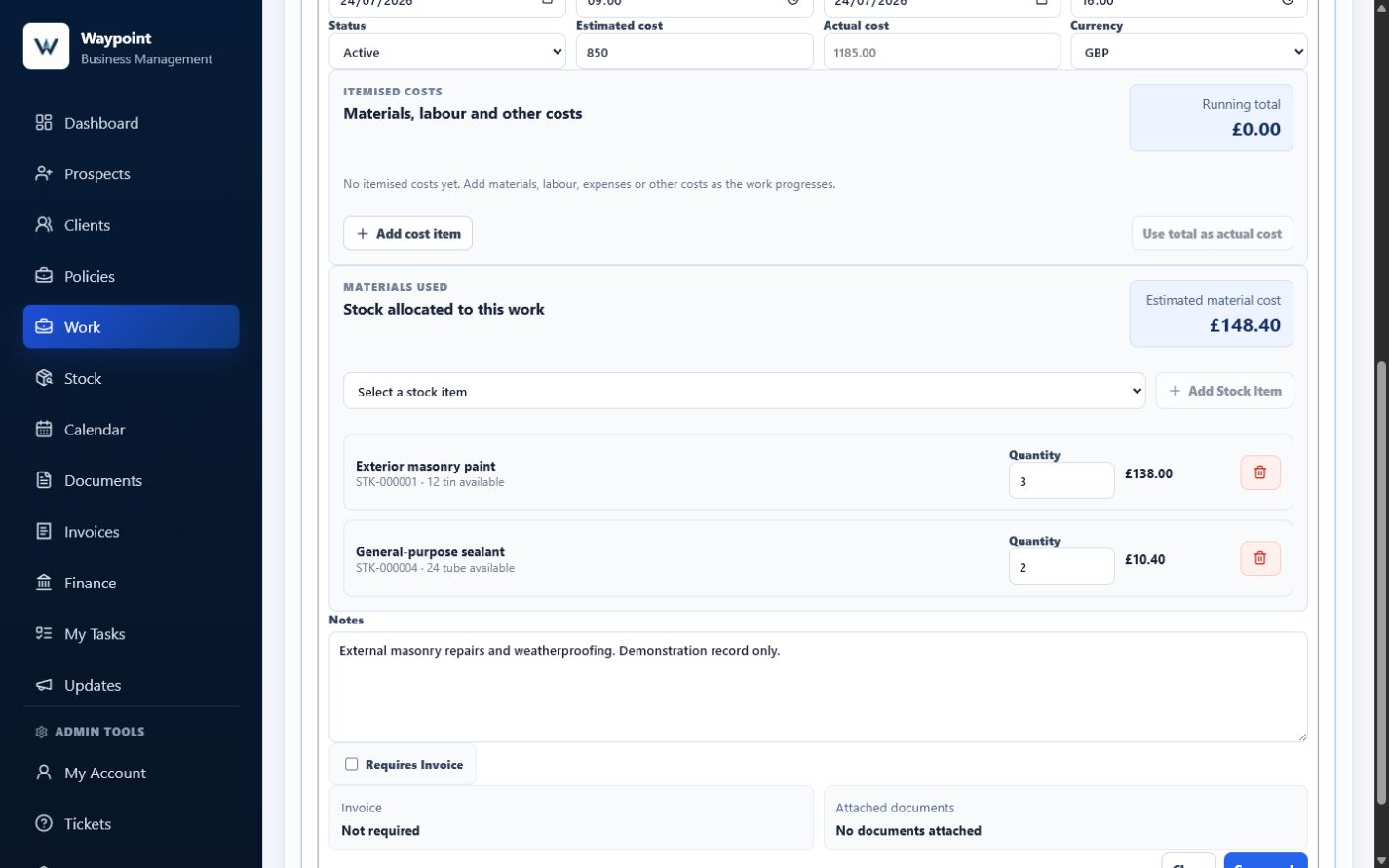
The strongest part of Stock Management is not the inventory list by itself. It is the connection between stock and the Work that uses it.
Materials can be selected inside a Work record so the expected usage stays alongside the client activity rather than in a separate spreadsheet or handwritten list.
For each allocation, the Work record shows the selected item, stock reference, current availability, required quantity and estimated line cost. It also calculates the combined estimated material cost.
In the demonstration shown here, Exterior office repairs for Harbour Property Services Demo uses three tins of exterior masonry paint and two tubes of general-purpose sealant. The costs are £138.00 and £10.40, producing an estimated material total of £148.40.
See availability before completing the Work
A Work record may require more of an item than the business currently has available. Waypoint shows the available quantity while materials are being allocated and warns when the requirement is too high.
If any allocated item has insufficient stock, completion is blocked. Waypoint does not partially deduct the other materials and leave the Work in an uncertain state.
This does not replace the business’s judgement, but it makes the stock position visible at the point where it matters. The user can check whether more material must be ordered, whether the required quantity has changed, or whether the recorded stock position needs correcting.
Automatically deduct materials when Work is completed
When the Work is completed, Waypoint deducts each unconsumed material allocation from stock and creates a Used movement linked to that Work.
This removes the separate step of completing the job and then remembering to update an inventory spreadsheet afterwards.
The resulting journey is clear: Stock item → Material selected for Work → Work completed → Stock deducted → Movement retained.
The allocations are stamped as consumed so completing the same Work again cannot deduct them twice. Reopening completed Work does not automatically return the stock, and consumed allocations cannot be changed. If the business needs to correct or return a quantity, it should record the appropriate movement so the reason remains visible.
Understand where stock went
A quantity on its own tells only part of the story. A business may also need to know which Work used the item, when the stock was deducted, how many units were used and who completed the action.
A movement generated by Work completion retains the Work identifier and name. That gives the business a useful starting point when a balance appears lower than expected.
Manually recorded receipts, returns, damage, write-offs and adjustments can carry their own reason. This keeps automatic Work usage and deliberate corrections inside the same operational history.
Import existing stock without starting again
Many businesses already hold their inventory in Microsoft Excel or CSV files. Waypoint accepts .xlsx and .csv stock imports up to 5 MB and 5,000 rows, with Item Name required for each usable row.
The current import offers three modes. Add New creates items that do not already match and skips matches. Update Existing updates matching items and skips new ones. Replace Existing Stock List archives the current active list first, then updates and restores matches or creates the new rows supplied.
Matching uses the Waypoint stock reference or SKU without case sensitivity. Results report imported, updated, skipped and failed rows, with individual errors where a row cannot be used.
There is no separate preview step in this version. Businesses should review their source file, use the downloadable CSV template where helpful and check the reported results rather than assuming every spreadsheet structure can be interpreted automatically.
Export stock when required
The Stock interface provides an Excel export, while the export service also supports CSV. The export includes the full stock list, including archived records, rather than applying the current screen filters.
The supported fields include stock reference, item name, category, description, SKU or part number, supplier, available quantity, unit, costs, reorder level, storage location, notes and status.
This can support an internal review, stock count, separate analysis, authorised sharing or an operational extract. It is not formal accounting, statutory inventory reporting or a substitute for professional financial records.
Archive items without erasing their history
Businesses do not need every stock item forever. A product may be discontinued, a material may no longer be used or a supplier reference may be replaced.
Archiving removes the item from the active working list while retaining the relevant record and movement context. Archived items can be included through the status filter and can be restored when needed.
This is safer than deleting the operational evidence behind previous Work. The current interface also supports selecting and archiving several active items together.
Permissions remain part of the platform
Stock Management uses Waypoint’s existing role and server-side permission model. Access is not controlled merely by hiding a navigation tab.
Owners and administrators can use the Stock actions available to the workspace. Managers can read, create, update, archive, import and export stock. Members can read, create and update stock but cannot archive, import or export it. Read-only users can view stock without changing it.
The protected routes enforce the corresponding stock.read, stock.create, stock.update, stock.archive, stock.import and stock.export permissions. Allocating or consuming materials through Work also requires the relevant Work and Stock authority.
Optional by design
Not every business manages stock. A consultant, adviser or service business may have no need for an inventory area.
That is why Stock Management is optional and disabled by default. A workspace owner or administrator can enable it through Business Setup; if it is not relevant, the feature can remain switched off and Waypoint stays focused on the areas the business actually uses.
This reflects a wider Waypoint principle: businesses should not have to navigate features they do not use simply because another industry needs them.
The same platform can remain focused for a professional service while supporting products and materials for a trade, supplier or field-service business.
Keeping Waypoint practical
Waypoint Stock Management is not intended to replace specialist warehouse-management software, supply-chain systems or accounting platforms. Those products serve larger and more complex requirements.
The purpose of Waypoint is to answer the operational questions small businesses face every day.
- What stock do we currently have?
- Which items are running low?
- What was allocated to this Work?
- Do we have enough material available?
- Where did this stock go?
- Who recorded the movement?
- What is the estimated material cost?
These questions should not require several disconnected spreadsheets to answer.
One more part of the business kept connected
Waypoint can carry the same operational story forward into invoices, recorded payments and the current Finance position.
For businesses organising their processes early, choosing one dependable business system can reduce duplicate administration as the operation grows.
Stock Management fits into a wider Waypoint journey: Prospect → Client → Work → Materials → Invoice → Payment → Finance.
A stock item is not isolated from the rest of the business. It supports the Work being delivered, its estimated cost helps explain that activity, and its movement can show where the material was used.
That connection is more valuable than simply adding another tab.
Built around feedback, not assumptions
Waypoint is still developing, and that is one of its strengths. The platform is being shaped through conversations with the people who deal with these operational problems every day.
Stock Management exists because a real business described a real workflow fragmented across several tools. That feedback did not result in a copied warehouse system or an unnecessary collection of enterprise features. It produced a focused first version designed to solve the practical problem.
This is how we want Waypoint to continue growing: not by attempting to become the largest platform, but by becoming the most useful one for the businesses it serves.
Stock Management Version 1
This release establishes the foundations: structured stock records, categories and generated references, search and filters, low-stock visibility, controlled movements, CSV and Excel import, supported exports, Work material allocation, availability warnings, estimated material costs, automatic deduction, archiving and role-based permissions.
Future improvements will continue to be guided by genuine use and feedback. We will avoid promising specific functionality until it has been designed, tested and approved.
Thank you for helping shape Waypoint
Thank you to everyone who continues to test Waypoint, challenge ideas and explain how their business operates.
Those conversations have a direct effect on what is built. Every workflow shared with us helps expose where administration becomes repetitive, where information becomes disconnected and where Waypoint can provide a more practical answer.
Stock Management is another example of that process working—one more step towards a connected business platform built around real businesses rather than assumptions.
Frequently asked questions
Is Stock Management enabled automatically?
No. Stock Management is optional and disabled by default. A workspace owner or administrator can enable it through Business Setup.
What can I store against a stock item?
The current interface supports an item name, category, description, generated stock reference, SKU or part number, supplier, opening quantity, unit, reorder level, unit cost, optional selling price, storage location and notes.
Can I import my existing stock list?
Yes. Waypoint accepts CSV and Excel files using Add New, Update Existing or Replace Existing Stock List. Matches use the stock reference or SKU, and the result reports skipped and failed rows.
Can I export my stock?
Yes. The interface provides Excel export and the export service also supports CSV. The exported file contains the full list, including archived items.
How are stock quantities maintained?
Waypoint stores the current balance and updates it atomically when a valid stock movement is recorded. Recent movement history explains the changes behind that balance.
Can I see why a stock quantity changed?
Yes. Movements retain their type, quantity change, resulting balance, reason, recording user and time, plus a Work link where one applies.
Can stock be connected to Work?
Yes. The Materials Used area lets users allocate stock items and quantities to an authorised Work record.
Does Waypoint warn me when there is not enough stock?
Yes. The Work record shows current availability, and completion is blocked without any partial deduction when an allocated quantity is unavailable.
When is stock deducted?
Unconsumed material allocations are deducted when the relevant Work is completed. Reopening does not return stock, and completing the same Work again does not deduct it twice.
Can I see which Work used an item?
Yes. A movement generated through Work completion retains the related Work identifier and name.
Can old stock items be archived?
Yes. Items can be archived individually or in bulk, remain available through the archived filter and can be restored.
Is Waypoint a warehouse-management system?
No. Waypoint provides practical operational stock management for businesses that need to connect inventory with clients and Work. It does not replace specialist warehouse or supply-chain platforms.